今天使用mapstruct遇到了很奇怪的问题,我构建某个包,发现target/classes目录生成了XConvertor的实现类class
此时可以正常编译启动,但是我此时又单独install该包,发现有生成了和classes同级的generated-sources/annotations目录
里面是XConvertor的实现类java文件,导致项目编译提示类重复?

将target删除之后重新启动(当然包括构建过程),编译通过了,推测一定是存在重复生成类了
首先我们明确一个启动和构建的概念
idea启动使用的starter本质上还是本地调试,入口是main方法
构建是构建本工程所有的包,跟启动类没任何关系,即使启动类没依赖某包,如果idea启动配置设置了启动前编译,那么所有包都会进行构建生成target资源目录
而启动是使用具体的target资源文件或本地仓库中的jar,这就是为什么我们工程内修改代码,如果启动类依赖该本工程内的包,我们修改之后可以直接热部署,相当于通过本地重新生成target目录来实现的
比如启动器Starter依赖了abc三个依赖,本地工程有abde五个包,
所以进行启动,先对abde五个包进行全量对比构建,构建之后进入启动类的依赖关系中,使用ab两个包的target目录资源(可进行热部署),使用本地仓库的c.jar
所以我们可以推断出:本地build时,在target/classes中mapstruct生成了实现类的class,而我们在mvn 周期install时,又相当于是经过了”build“,所以又在插件/工具的:注解动态生成路径annotation中生成了实现类的java源代码,而idea认为一个包里,同一引用路径下出现同名java不合理(没区分class/java),所以报错
但是可以推测target目录大概率是有缓存的,因为按照推断的再次编译,发现复现不了错误,所以遇到这种动态生成的错误,如果clean没有效果,直接删除target目录,重新构建即可
接着看第二个问题,因为没有区分pom和target的关系,出现以下错误
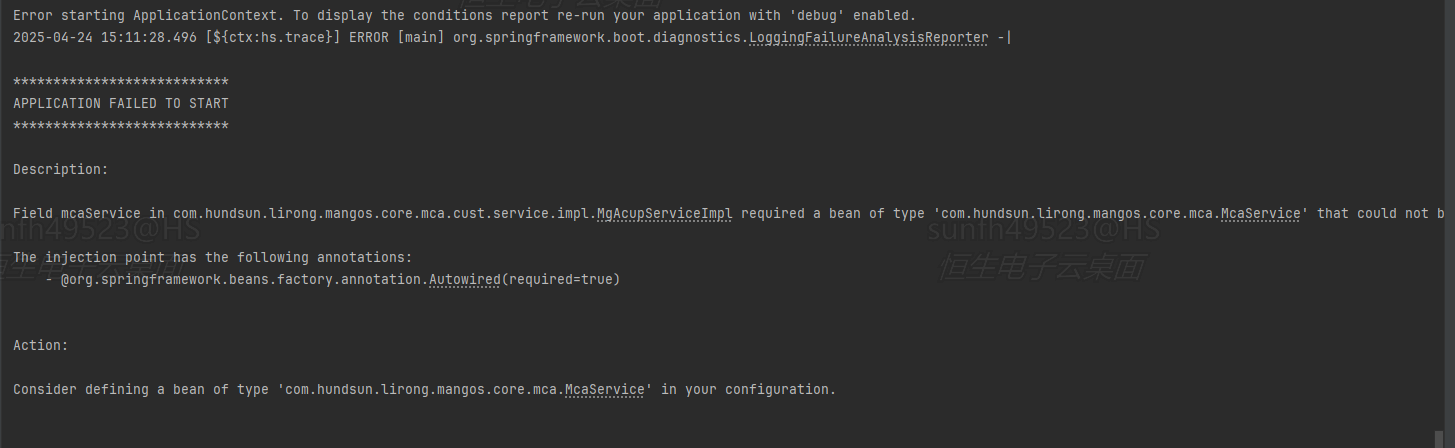
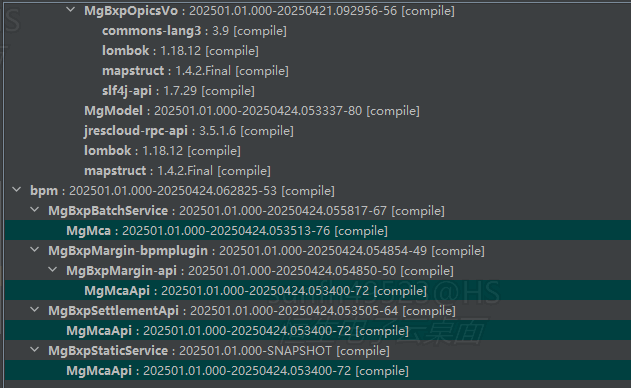
启动过程报错,分析pom关系,发现MgMcaApi是被引用的,实现类在McaStaticImpl中,虽然McaStaticImpl进行了编译且就在本工程,但是启动类没引入实现类依赖,所以根本不会用到,所以找不到注入的实现类
附一下GPT答案
你的问题涉及 MapStruct 代码生成机制与 Maven 构建生命周期的冲突,根本原因在于 注解处理器生成的代码路径未被正确管理。以下是详细分析和解决方案:
1. 问题根源分析
(1) MapStruct 的工作流程
- 代码生成阶段:MapStruct 在编译时(
**<font style="color:rgb(64, 64, 64);background-color:rgb(236, 236, 236);">compile</font>**阶段)通过注解处理器(Annotation Processor)生成接口的实现类。 - 默认生成路径:生成的 Java 文件会输出到
**<font style="color:rgb(64, 64, 64);background-color:rgb(236, 236, 236);">target/generated-sources/annotations</font>**目录。 - 编译行为:这些生成的 Java 文件会被编译成
**<font style="color:rgb(64, 64, 64);background-color:rgb(236, 236, 236);">.class</font>**文件,最终存放在**<font style="color:rgb(64, 64, 64);background-color:rgb(236, 236, 236);">target/classes</font>**目录。
(2) 冲突的产生
- 直接编译(
**<font style="color:rgb(64, 64, 64);background-color:rgb(236, 236, 236);">mvn compile</font>**):
生成**<font style="color:rgb(64, 64, 64);background-color:rgb(236, 236, 236);">generated-sources/annotations/XConvertorImpl.java</font>**→ 编译为**<font style="color:rgb(64, 64, 64);background-color:rgb(236, 236, 236);">classes/XConvertorImpl.class</font>**,流程正常。 - 执行****
**<font style="color:rgb(64, 64, 64);background-color:rgb(236, 236, 236);">mvn install</font>******时:
Maven 会重新触发完整的构建生命周期(包括**<font style="color:rgb(64, 64, 64);background-color:rgb(236, 236, 236);">generate-sources</font>**阶段),导致:
1. 重新生成**<font style="color:rgb(64, 64, 64);background-color:rgb(236, 236, 236);">generated-sources/annotations/XConvertorImpl.java</font>**。
2. 编译时发现**<font style="color:rgb(64, 64, 64);background-color:rgb(236, 236, 236);">classes/XConvertorImpl.class</font>**已存在,同时尝试编译新生成的 Java 文件,导致 重复类错误。
(3) 关键矛盾点
- 生成代码路径未被清理:执行
**<font style="color:rgb(64, 64, 64);background-color:rgb(236, 236, 236);">install</font>**时,Maven 可能未正确清理旧的生成文件(如残留的**<font style="color:rgb(64, 64, 64);background-color:rgb(236, 236, 236);">.class</font>**文件)。 - 生成代码与编译代码混合:编译器同时发现
**<font style="color:rgb(64, 64, 64);background-color:rgb(236, 236, 236);">.java</font>**和**<font style="color:rgb(64, 64, 64);background-color:rgb(236, 236, 236);">.class</font>**文件,误认为重复。
2. 解决方案
(1) 强制清理生成目录
在 **<font style="color:rgb(64, 64, 64);background-color:rgb(236, 236, 236);">pom.xml</font>** 中配置 maven-clean-plugin,确保每次构建前清理旧文件:
xml
复制
下载
运行
1 | <build> |
(2) 显式指定生成代码路径
通过 build-helper-maven-plugin 明确告诉 Maven 生成代码的位置,避免路径混乱:
xml
复制
下载
运行
1 | <plugin> |
(3) 配置 MapStruct 注解处理器
确保 **<font style="color:rgb(64, 64, 64);background-color:rgb(236, 236, 236);">maven-compiler-plugin</font>** 正确绑定 MapStruct 的注解处理器,避免重复生成:
xml
复制
下载
运行
1 | <plugin> |
3. 验证流程
清理旧构建:
- bash复制下载mvn clean
重新构建并安装:
- bash复制下载mvn install
- 检查生成路径:
**<font style="color:rgb(64, 64, 64);background-color:rgb(236, 236, 236);">target/generated-sources/annotations</font>**应只有**<font style="color:rgb(64, 64, 64);background-color:rgb(236, 236, 236);">.java</font>**文件。**<font style="color:rgb(64, 64, 64);background-color:rgb(236, 236, 236);">target/classes</font>**应只有编译后的**<font style="color:rgb(64, 64, 64);background-color:rgb(236, 236, 236);">.class</font>**文件,无重复。
4. 常见陷阱
| 问题 | 表现 | 解决方案 |
|---|---|---|
| IDE 缓存未清理 | 代码重复报错,即使执行 **<font style="color:rgb(64, 64, 64);background-color:rgb(236, 236, 236);">mvn clean</font>** |
手动删除 **<font style="color:rgb(64, 64, 64);background-color:rgb(236, 236, 236);">target</font>**目录,重启 IDE |
| 多模块项目依赖未更新 | 子模块生成的代码未同步到父模块 | 使用 **<font style="color:rgb(64, 64, 64);background-color:rgb(236, 236, 236);">mvn install -DskipTests</font>**重新安装 |
| 注解处理器版本冲突 | 生成代码不完整或报错 | 统一 MapStruct 和处理器版本 |
5. 总结
- 核心问题:Maven 在
**<font style="color:rgb(64, 64, 64);background-color:rgb(236, 236, 236);">install</font>**阶段未正确管理生成代码和编译结果的路径,导致**<font style="color:rgb(64, 64, 64);background-color:rgb(236, 236, 236);">.java</font>**和**<font style="color:rgb(64, 64, 64);background-color:rgb(236, 236, 236);">.class</font>**文件共存。 - 解决关键:通过插件配置强制清理生成目录、显式指定代码生成路径、确保注解处理器正确绑定。
- 预防措施:始终在多模块项目中统一构建命令,避免手动干预生成文件。
如果您喜欢此博客或发现它对您有用,则欢迎对此发表评论。 也欢迎您共享此博客,以便更多人可以参与。 如果博客中使用的图像侵犯了您的版权,请与作者联系以将其删除。 谢谢 !